Category: Tech

  • Unlocking Better Internet: How Xfinity WiFi Pass and Xfinity WiFi Extender Make Life Smoother

    Unlocking Better Internet: How Xfinity WiFi Pass and Xfinity WiFi Extender Make Life Smoother

    In today’s world, fast and reliable internet isn’t a luxury — it’s a basic need. Whether you’re working remotely, gaming, streaming, or just scrolling TikTok, you need WiFi that actually works.
    If you’re an Xfinity user, you might have heard about tools like the Xfinity WiFi Pass and the Xfinity WiFi Extender — but what are they really? And how do they change your internet game?
    Let’s dive in.

    Read Also: Cloud services

    What is the Xfinity WiFi Pass?

    The Xfinity WiFi Pass is a smart solution that gives you access to millions of secure Xfinity WiFi hotspots across the country — without needing a full Xfinity home internet plan.

    It’s basically a pay-as-you-go internet option.
    You pay a small fee (usually around $20 for 30 days) and you instantly unlock hotspot access for your laptop, tablet, or smartphone.

    Why Use the Xfinity WiFi Pass?

    • No contracts: Forget long-term deals or installation fees.
    • Nationwide access: Use WiFi in cafes, airports, parks, or your neighborhood.
    • Instant connection: Sign up and start browsing within minutes.
    • Secure browsing: Hotspots are encrypted to protect your data.

    Perfect if you’re traveling, between apartments, or just need reliable temporary WiFi without the hassle of setting up full service.

    What is the Xfinity WiFi Extender?

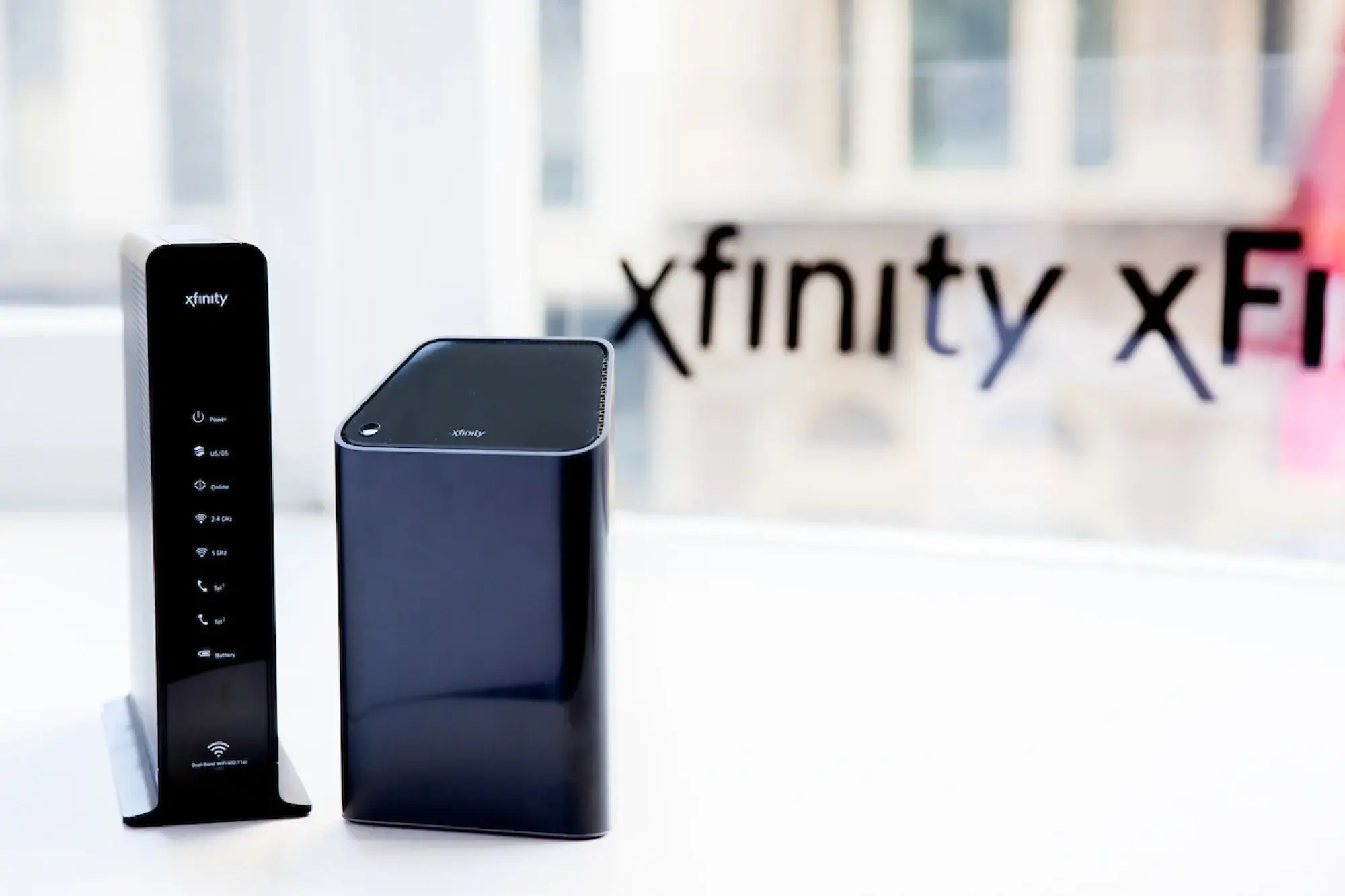
    Now let’s talk about the Xfinity WiFi Extender (sometimes called the xFi Pod).
    If you already have Xfinity home internet but notice dead zones in your house, this is the tool you need.

    A WiFi extender takes the existing signal from your Xfinity Gateway router and boosts it to cover areas where the signal is weak — bedrooms upstairs, garages, patios, or basements.

    Why Add an Xfinity WiFi Extender?

    • Full-house coverage: No more annoying spots where WiFi randomly dies.
    • Better speeds: Even far away from your main router, you get faster internet.
    • Easy setup: Plug it into a wall socket, pair it with your router via the Xfinity app, and you’re good to go.
    • Seamless connection: Your devices automatically connect to the best signal without switching networks manually.

    Xfinity WiFi Pass vs. Xfinity WiFi Extender: What’s the Difference?

    FeatureXfinity WiFi PassXfinity WiFi Extender
    Main PurposeAccess public WiFi hotspotsBoost your home WiFi signal
    Setup NeededNone (just login)Plug and sync with router
    Best ForTravelers, temporary usersHomeowners, renters
    Price~$20/month (pass only)One-time device cost

    In short:
    If you don’t have Xfinity home internet, the WiFi Pass is your way to stay connected.
    If you do have Xfinity but struggle with dead zones, grab a WiFi Extender.

    Read Also: WiFi Hotspot Services

    How to Get Started with an Xfinity WiFi Pass

    1. Find an Xfinity hotspot (they’re everywhere — Starbucks, malls, even random neighborhoods).
    2. Connect to “xfinitywifi” on your device.
    3. Open your browser, and you’ll be redirected to the Xfinity sign-up page.
    4. Purchase a pass using your card or PayPal.
    5. Start browsing with secure, high-speed WiFi.

    Pro Tip:
    Use the Xfinity WiFi Hotspot app to easily locate nearby hotspots without wasting time.

    How to Set Up Your Xfinity WiFi Extender

    Setting up an Xfinity WiFi Extender (xFi Pod) is super easy:

    1. Plug the extender into an outlet halfway between your router and the dead zone.
    2. Use the Xfinity app to pair it to your Gateway.
    3. Optimize placement by moving it if necessary for the best signal.
    4. Done! Enjoy seamless internet throughout your home.

    No complicated wiring, no weird tech skills needed.

    FAQs About Xfinity WiFi Pass and Xfinity WiFi Extender

    Q: Is the Xfinity WiFi Pass unlimited?
    A: Yes, during the active period (usually 30 days), you get unlimited access to Xfinity WiFi hotspots.

    Q: Do I need an Xfinity account for the WiFi Pass?
    A: Nope! Even non-customers can buy a WiFi Pass.

    Q: Can I use multiple WiFi Extenders in my house?
    A: Absolutely — large homes often need two or more xFi Pods for full coverage.

    Q: Will an Xfinity WiFi Extender slow down my internet?
    A: No. It’s designed to improve stability and coverage without reducing your speed.

    Final Thoughts: Which One is Right for You?

    The Xfinity WiFi Pass and Xfinity WiFi Extender are built for two very different needs — but both deliver what today’s internet users demand: fast, reliable, flexible connection.

    If you’re always on the move and need secure hotspots everywhere you go, the WiFi Pass is a no-brainer.
    If you’re frustrated with weak signals inside your home, investing in an Xfinity WiFi Extender will seriously upgrade your daily life.

    Either way, Xfinity’s tools make sure you’re never stuck offline when it matters most.

  • How to download Twitter and Snack Videos for free

    How to download Twitter and Snack Videos for free

    If you’ve used Twitter or Snack for any length of time, you’ve undoubtedly come across a video that you wish you could save and watch later while you weren’t connected to the internet. Perhaps you intended to show the video to a friend who doesn’t use Twitter, or you wanted to post it on a different site. You may have known you wanted to watch the video again because it was so good. Whatever the situation may be, this is problematic because neither Twitter nor snack offers a way to download Video from the site directly. And that’s why you need a Twitter video downloader or a snack video downloader.

    How can You save a Twitter video?

    1. Access the Twitter video you wish to save.
    2. After clicking the “Share” button, look for the “Copy link” option in the pop-up menu.
    3. Paste the link into the main page of the Twitter Video downloader.
    4. The link will be processed a few seconds after you click the “Download” button.
    5. Choose the preferred quality, then click the Download button.

    Use the Twitter Video Downloader

    With the aid of a Twitter video downloader, you can easily grab videos from the Twitter media platform and store them locally on your device. There is a wide variety of these downloaders available. Some are browser-based applications, while others need downloading and installing on your device.

    Step 1: Link to copy

    Just copy the address to save the Twitter video or GIF.

    Step 2: To copy and paste a URL

    To start downloading a Twitter video or gif, copy the link and paste it into your browser’s address bar.

    Step 3: Video Download from Twitter

    Save a video or gif from Twitter to your computer by clicking the corresponding download icon.

    There are several reasons to utilize the Twitter Video Downloader tool.

    • You may download a video in high resolution. Your video editing and sharing needs may be met with this excellent service.
    • You can get it for nothing. A limitless number of videos are available for download. All of our pages consist of advertisements.
    • There’s no need to provide your Twitter handle. To access our site, just copy and paste the following.
    • Speedy download speed for Twitter videos.
    • Compatible with all platforms and browsers.

    How can You save a Snack video?

    Recent web sensations that may generate revenue, like the Snack Video app, are starting to see a surge in interest from developers. Like Snack Video and Twitter, these short-form video creation applications may monetize their user base through video views.

    For example, you may use it to get paid to watch movies or do simple activities. If your following is large and expanding rapidly, you might be able to endorse a product on your own. When you try to save a movie from one of these apps, you’ll often see a watermark or metadata. The identification card is a kind of protection against illegal activities like movie piracy or other careless behavior.

    How can You save a Snack video?

    1. Your phone’s Play Store will search for the app when you open it and input Video Downloader For Snack Video Without Watermark.
    2. Install it next.
    3. Next, find the video you wish to download without a watermark by using the Video Snack app or.
    4. On the share icon to the right of the video, click it. The choice to copy the URL or link will be available.
    5. The Video Downloader for Snack app may now be open.
    6. Insert the URL you already copied into the available column.
    7. Following that, wait a short while for the app to show the video for download.
    8. It may be distributed to others after being download.

    Use the getsnackvideo.com

    GetSnackVideo is widely use as a means to obtain Snack videos. Our service is fully functional both with and without a watermark, and it only requires a web browser and a legitimate URL, which you paste into the main page.

    Step 1: Link to copy

    The first step in downloading a video is watching it on your mobile device..

    Step 2: To copy and paste a URL

    Choose “Share,” and then “Copy link”

    Step 3: Video Download from Twitter

    Put the URL on our homepage and hit “Download.”

    There are several reasons to utilize the Snack Video Downloader tool.

    • Easy snack-time video downloading that doesn’t include an annoying watermark. It’s the best way to get your films out there and into circulation.
    • There is no cost. You’re free to save as many videos as you like. The pages only have little advertising.
    • There is no need to sign up with a special username for Snack. Just copy the URL and paste it into your browser to access our site.
    • The speed of the download was satisfactory.
    • Universal compatibility with web browsers and ioS.

    The final word

    This is everything we know about sharing information regarding snack video download and Twitter Video Download via digital mediums. Of course, you may put this technique to use on your preferred mobile device or computer. We appreciate your interest in our post and hope you find the information provided to be helpful.

    READ MORE! FLATGREAT